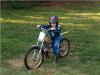
September 13, 200521 yr Had to go get my lad an electric bike that we saw in the store the other day. Put it together he got on and rode it, keeps flying past the window as I post this.
September 13, 200521 yr Author "Dad can I go ride where I want and not in the front field" only been riding it half an hour and wants to go do the big stuff
September 13, 200521 yr Author The one he's on is the dirt rocket MX 350, they have all sorts of stuff. http://www.razor.com
September 14, 200521 yr What`s with the number #2 on the plate ????? Gotta kick Dad`s butt, before he gets #1.
September 14, 200521 yr Author T'other lad has the number one plate, well he rode it till it died, down side is it takes 12 bloody hours to charge, his head was steaming with sweat when it finally wouldn't go no more, in fact I think it had quit a while before then but he just kept pushing with his legs. He was in tears so I said get on this one it won't die, so he got on Trevor's 50 sherco and scared his sen a bit, capped me when he saved it after getting into a bit of a tank slapper, but he didn't throw it away, we made sure we didn't tell mum about that part Tykes only just five and his first day on self propelled tackle, thrilled to bits he was.
September 19, 200521 yr Sounds like your going to need a couple of spare, pre-charged batteries, and a direct link into the power grid.
October 13, 200521 yr Author One month later, electric bike did it's job (got him going) but after two weeks it just didn't run long enough on a charge to feed the need, so I got him a second hand suzi JL 50, thought that would keep him happy for at least a year, wrong!! couple of weeks of riding the nuts off that he noticed it didn't go ower stuff like his brothers bike, so asked if he could try the Sherco 50. I don't think I have ever seen a kid so keen to ride, every day first thing out of his mouth is can I ride.


Join the conversation
You can post now and register later. If you have an account, sign in now to post with your account.