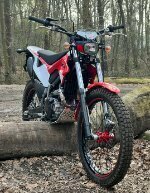
February 1, 201016 yr Hello i'm new and dont know wich rear & front tire to put on my trial. I generaly ride on a hard underground when the wether is dry. the bike: Beta Rev 3 4-stoke - 2008. Thanks & greathing Luc from Belgium.
February 1, 201016 yr Michelin X-Lights which are Brilliant Tyres, or Michelin X11's. Edited February 1, 201016 yr by GasGasben
February 2, 201016 yr Author OK now there are X11's on the bike so i think i am going to put them again on the bike. Greathings Luc
February 2, 201016 yr Hi Luct4, personally i would suggest a Michelin X11 on the front and an IRC on the rear, seems to be the most popular combination. Regards GaffaMont.
February 2, 201016 yr Hi Luct4, personally i would suggest a Michelin X11 on the front and an IRC on the rear, seems to be the most popular combination.Regards GaffaMont.
February 2, 201016 yr Author Hello why the ICR on the rear? Controle, max. grip , stability ??? Greathings Luc
February 2, 201016 yr Author ...is not new....just a Belgium guy who does not write verry well English...... greathing Luc (the Belgium guy)
February 2, 201016 yr Hi Luct4, personally i would suggest a Michelin X11 on the front and an IRC on the rear, seems to be the most popular combination.Regards GaffaMont.


Join the conversation
You can post now and register later. If you have an account, sign in now to post with your account.