April 2, 201313 yr I notice on some TY250 the left hand crankcase cover has been cut down to expose the front sprocket, I presume this is to make it easier to change the sprocket without disturbing the electrics. Two questions am I right and secondly is there an optimal position to cut the case? I have a 1974 model. Thanks for any help
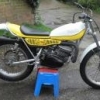
April 2, 201313 yr Mud and debris are the common problems which can then throw the chain. By removing the case to change sprockets you would be in your workshop and the only thing you are disturbing is the waterproofing on the case which can easily be redone when the sprocket is changed. Cutting the case can easily be done and this one is fitted to my current TY250A Tony
April 3, 201313 yr Author Thanks very much for the clarification and Tony thanks for the photos. Looks like not only have I got to get the Jigsaw out but the buffing machine as well, your bike looks fantastic. Regards Mark
April 3, 201313 yr Agreed great looking bike. I always thought the look of the TY250A even in std form was prettier than the subsequent models but the motor was a bit more bulbous. Yours is a credit though.
April 12, 201313 yr wonder if the left side cover off a IT 250 would work on the TY 250...then you could unbolt the sproket cover..polish it up just a purty.. i know the IT175 covers work on the TY 175. anyone try this ?
April 12, 201313 yr heres the side covers left and right from a 78 IT250.. i dont have a TY 250 at this time, so i cant check to see if they would bolt up. i know those who have done so with the 175 and it cleans up the cases nicely, if you run without the oil injection, this would really thin the bike up.. what do you think?
April 12, 201313 yr Pretty sure that the clutch side wouldn't work, from memory the ty250 has a unique gasket & cover, below the kickstart is basically a straight line
June 28, 201313 yr I'm pretty sure the Magneto side cover wouldn't work either. The TY's bolt holes are on the inner side case's edge, and the IT's bolt holes are on the ouside. You can see this in the pictures above.
April 30, 20197 yr On 4/2/2013 at 3:04 PM, tony283 said: Mud and debris are the common problems which can then throw the chain. By removing the case to change sprockets you would be in your workshop and the only thing you are disturbing is the waterproofing on the case which can easily be redone when the sprocket is changed. Cutting the case can easily be done and this one is fitted to my current TY250A Tony Tony, Just admiring that TY250A that you did the tricks to. Is that frame chrome plated? or painted silver? or Powder coated? Any thoughts now? Things you would do differently? I am sort of restoring my TY 250 A and haven't decided on what to do with the frame coating? paint? powder coat? Etc Your thoughts are most appreciated! Nice work by the way! Tillerman6


Join the conversation
You can post now and register later. If you have an account, sign in now to post with your account.