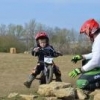
April 24, 201412 yr Hayden is FOUR today, and seeing as he has been riding for two years, and has seriously outgrown the 12.5 oset hes been trialing, hes got a new 2014 16 eco! Means he wont have the issues of small wheels between rocks! He also got a stand for it too! Do you think he looks happy! And his old 12.5 Edited April 24, 201412 yr by hayden2010
April 25, 201412 yr Awesome! Lucky kid. And happy Dad I bet to see him enjoy and get to spend riding time together. it doesn't get any better than that.
April 26, 201412 yr Author Thanks all, he had his first day out on it today, the rocks and logs are so much easier for him now, has the power to hop up over them!! Although he did decide to stop halfay up a decent rock outcrop, slipped sideways (it was VERY muddy) and has now got a decent black eye!!


Join the conversation
You can post now and register later. If you have an account, sign in now to post with your account.