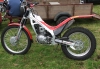
December 5, 200421 yr Son has an 02 250 Pro and he was out on it today. Started warm engine and selected first gear.No problem. Let out the clutch and pulled away and there was a "strange Noise" then it jumped out of gear. He selected nuetral and restarted engine. No noise till he selected first again and again it jumped out. Pushed it back to the van. Anyone experienced this before i start stripping it down?
December 5, 200421 yr Check that the gear lever is clear of the chain! If the lever is not completely home on the shaft the chain can catch and knock the bike out of gear when setting off.
December 6, 200421 yr Is the shifter still returning on it`s own (if not just the return spring can be broke) Can you shift to other gears? The Pro has an eccentric cam for the shift drum that can be adjusted. Worst case is the aluminum shift forks are bent so you should update all the eternal parts.
December 6, 200421 yr Gary (Windlestone) Have a close look, he's probably clicking it out of gear when you're not looking, then it will be:- " look dad, me Pro's knackered, we might as well get matching Montesa 4T's !!!!!" mark my words....................... John.
December 14, 200421 yr dont the 02's have problems with the gearbox's? is that not kind of stating the obvious ,given the title/topic of this thread!


Join the conversation
You can post now and register later. If you have an account, sign in now to post with your account.