December 6, 201312 yr Got a strange one here, used the bike last Sunday with no problems runs like a dream, the last couple of days after its been stood overnight I'm having to drain the carb before it will start , once running it runs fine with no issues at all. Should I isolate the fuel It's kept on a stand with the back end higher than the front ( problem maybe) Can anyone shed any light on this for me. Tony
December 6, 201312 yr Do you close the fuel tap each time you put your bike away? If I didn't do that, my 315R used to be hard to start...
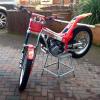
December 6, 201312 yr if its the stand in the pic the front is a lot lower which could cause fuel to run into cylinder try leaving it on the flat ,,,did it use to start ok could there be water in the fuel plug on way out ? jets need cleaning out ?
December 7, 201312 yr Author ive isolated the fuel and left it on the ground, ill try it this morning. the fuel tank, carb etc have all been cleaned numerous times so im hoping its just the way its kept on the stand. tony
December 7, 201312 yr I all ways turn off the fuel whilst the engine is ticking over until it runs out just before I put it away. Never have any problems when I come to start it again, no matter how long I leave it. Good luck.
December 7, 201312 yr Author Left it overnight fuel of and on its side stand and it started ok , I lturned of the petrol and left it run until it stopped as suggested , happy days


Join the conversation
You can post now and register later. If you have an account, sign in now to post with your account.