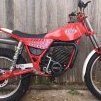
November 22, 20169 yr Author Turns out the seller had an extra NOS frame stashed away. And it's NOT hacked up, either!!! So working on a way to get this bike and put it all back together again, nice and proper. Thanks for the advice and encouragement! Two red bike might look nice together!
November 22, 20169 yr Nice one! Ask the seller if he has a spare flywheel side casing as it looks like the one on the bike has been repaired after a derailed chain damaged it. Not a big deal as they do come up for sale but a good one won't be cheap. I'd try to work out what sort of final costs you'll have once finished. Parts soon add up and there's always unexpected extras.
November 24, 20169 yr Author Nice one! Ask the seller if he has a spare flywheel side casing as it looks like the one on the bike has been repaired after a derailed chain damaged it. Not a big deal as they do come up for sale but a good one won't be cheap. I'd try to work out what sort of final costs you'll have once finished. Parts soon add up and there's always unexpected extras. Well... did find a new seat still in the bag!
November 26, 20169 yr Author I'm in Texas! Come visit and we'll try to ride this thing!!! And Happy Birthday, axulsuv!


Join the conversation
You can post now and register later. If you have an account, sign in now to post with your account.