February 16, 200620 yr James, Andy put this on that new supporter thread the other day After much to-ing and fro-ing until I got a design I was happy with (thanks to Vinnie and Ian for putting up with my fussiness!), the sticker artwork was approved and the order placed. They'll be through in around two weeks at which point I'll contact all supporters for their addresses.
February 16, 200620 yr Author sorry i didnt realise i was looking for the stiker thread but couldnt find it. Edited February 16, 200620 yr by james111089
February 16, 200620 yr James, your doing the right thing to post a new thread as it creates more than one voice to get the job done... .... it was some time back I signed up to TC and know surprises I
February 16, 200620 yr sorry i didnt realise i was looking for the stiker thread but couldnt find it. <{POST_SNAPBACK}> no worrys it is a massive thread 5 pages long
February 16, 200620 yr think i,ve got the full set now .thanks heath Edited February 16, 200620 yr by bri8617
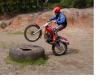
February 16, 200620 yr Ross Danby's gasser at the IOW last year. TC fork stickers courtesy of Andy at http://www.graffics.co.uk/
February 16, 200620 yr James, your doing the right thing to post a new thread as it creates more than one voice to get the job done....... it was some time back I signed up to TC and know surprises I
February 17, 200620 yr James, your doing the right thing to post a new thread as it creates more than one voice to get the job done....... it was some time back I signed up to TC and know surprises I
February 17, 200620 yr how can you get a sticker?? <{POST_SNAPBACK}> You would need to signup as a TrialsCentral Supporter, which is explained HERE Hope this helps, Andy


Join the conversation
You can post now and register later. If you have an account, sign in now to post with your account.