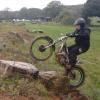
November 17, 201114 yr Hi, This is a video i put together have a look see what you think! P.s we know we aren't the best riders in the world! its just a bit of fun! rij Edited November 17, 201114 yr by rij
November 17, 201114 yr good video.... ya not trying hard enough if u dont fall off, besides more fun!
November 17, 201114 yr Great stuff - Thanks for posting - Trials is not all about winners - just about having fun. - video well put together keep up the good work.
November 17, 201114 yr Not sure "Tubby Trials Team" is the best name. Team "Jump Off Our Bikes a Lot" might work though...
November 17, 201114 yr remind me not to buy any of your old bikes! haha, looks super fun and now ill be singing that song all day.
November 17, 201114 yr Author Thanks for the nice words about the video! i'm sure you can be a member rusty! but you have to come out and play again! Rich
November 17, 201114 yr That was fun to watch. I like the gent that just looks at his bike after stepping off the back. (at the 10 sec. to 15 sec. marks) Like the bike is mental and should not have run off without him. Looks like a bunch of good friends having a great day out on the bikes. And I would bet the following phrase was said more than once "Oh yes, you definitely can make it over/up that." Followed shortly by "HAHAHA he tried it!"
November 17, 201114 yr Do you have a membership? Iam short,fat and bold is this good enough? minimum requirement's 14.5 stone trials bike sense of humour.


Join the conversation
You can post now and register later. If you have an account, sign in now to post with your account.